


Introduction
Imagine waking up tomorrow, and every single contact in your phone has been erased. To call your mom, you would have to memorize 10 digits. To order a pizza, you would need the store’s specific hard-to-remember line. To browse the web, you would have to type strings like 172.217.168.46 instead of google.com. If you have ever asked, “what is DNS?” you are essentially asking how the internet keeps from collapsing under the weight of its own complexity. As a digital marketing professional or business owner, you don’t just need a definition—you need to understand why DNS issues cause site outages, slow load times, and security breaches.
That nightmare scenario is reality without the Domain Name System (DNS).
Let’s pull back the curtain. Far from being “boring tech jargon,” DNS is the glue of the digital economy.
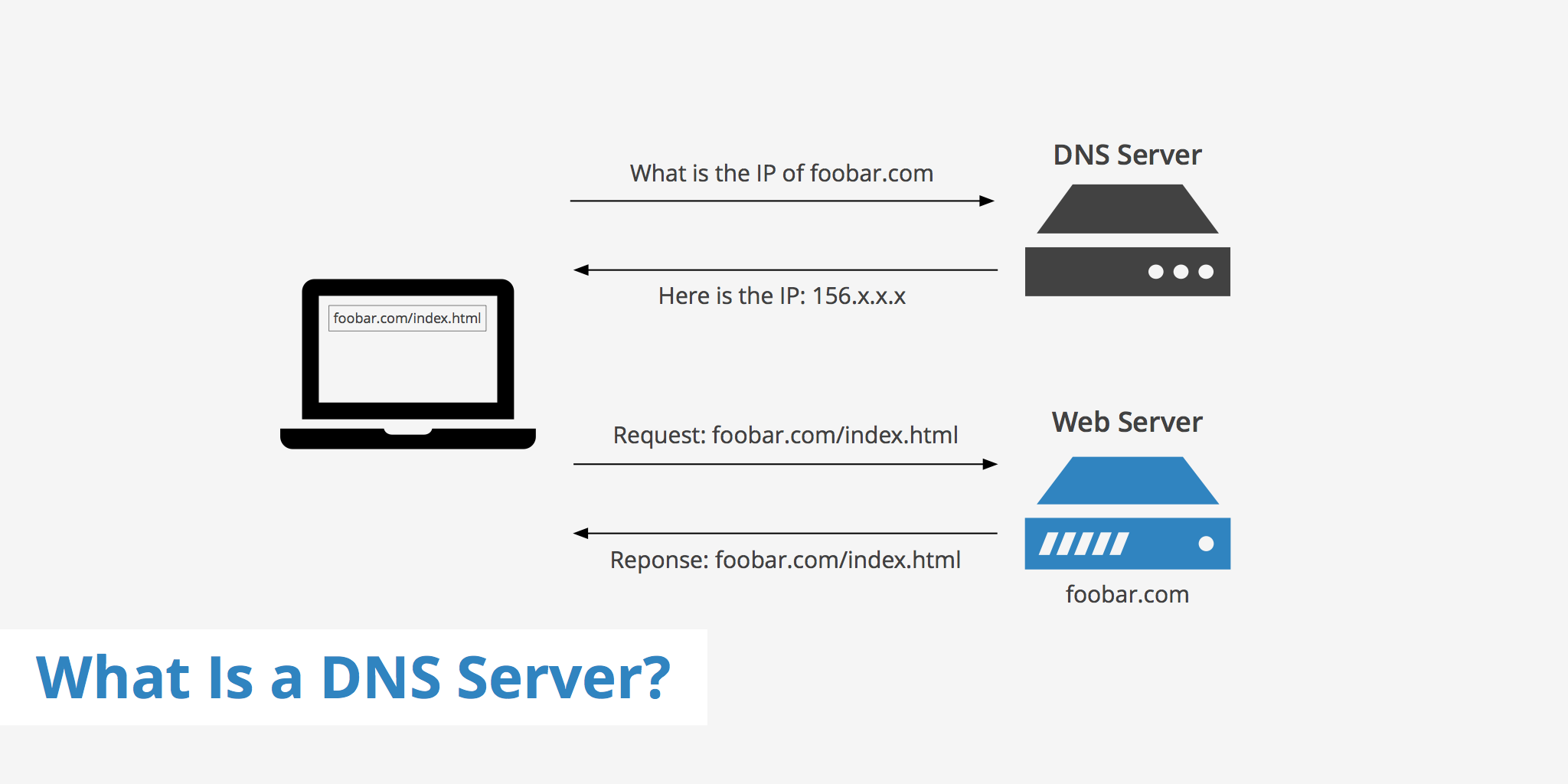
Why the “Phonebook” Analogy Falls Short
You have probably heard that DNS is the “phonebook of the internet”. It is a good starting point, but it misses a crucial detail: scale and speed.
A phonebook is static. You look up “Pizza Hut,” you find a number. DNS, however, works like a global, split-second courier system.
When you hit ‘Enter’ on a URL, the entire lookup process happens in roughly 30 to 50 milliseconds. That is faster than a hummingbird’s wing flap. To achieve this, DNS relies on a distributed architecture across millions of servers, not one central book.
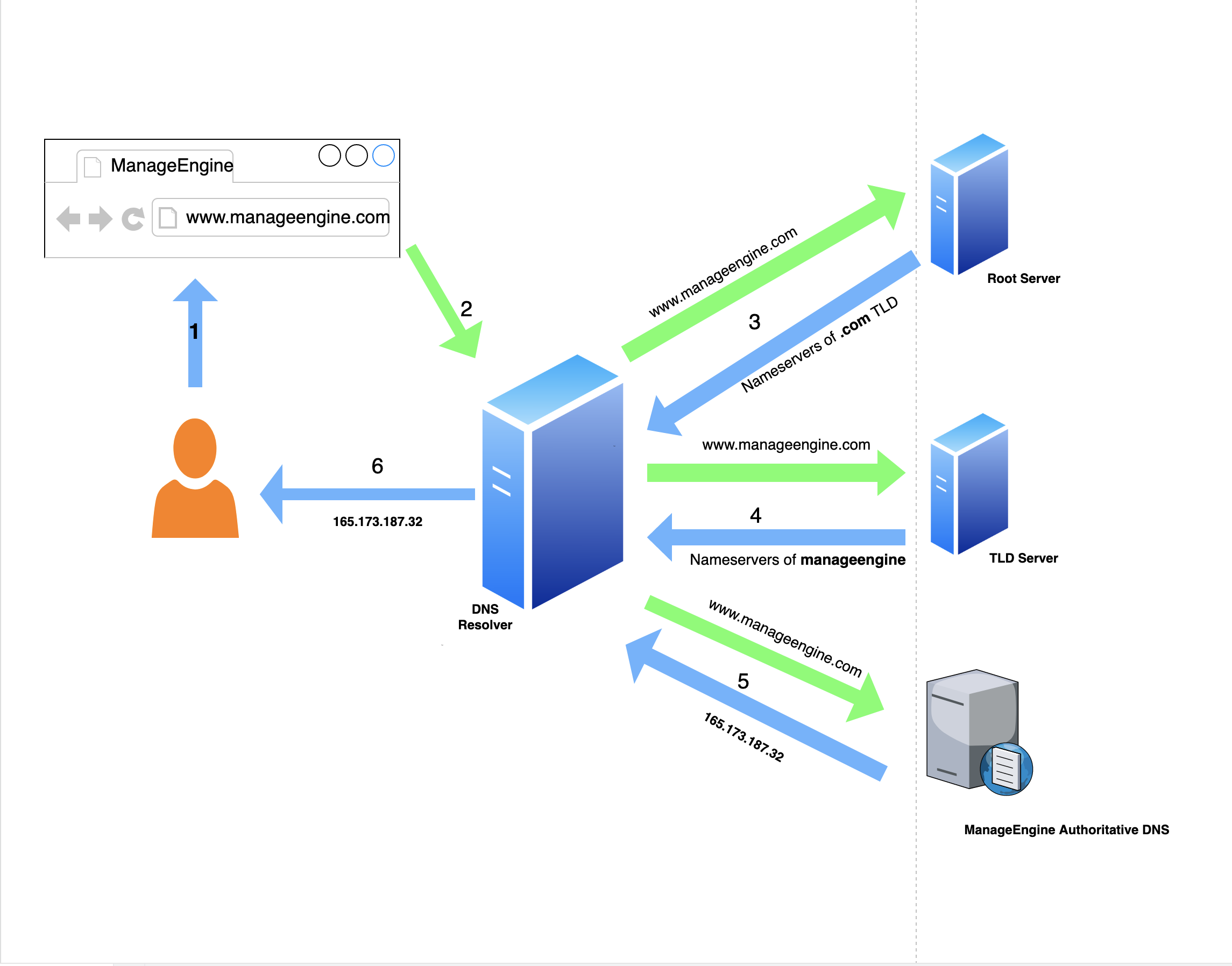
The 4-Step Journey of a DNS Query
To understand what DNS is, you have to follow the path of a query. Let’s say you type www.example.com into your browser. Here is the digital treasure hunt that unfolds:
Step 1: The Recursive Resolver (Your Librarian)
Your computer first asks a Recursive Resolver. Think of this as a librarian who doesn’t know everything but knows how to find everything. Usually, this resolver is managed by your Internet Service Provider (ISP) or a public service like Google (8.8.8.8) or Cloudflare (1.1.1.1).
Step 2: The Root Server (The Index)
The resolver asks the Root Server: “Where can I find .com?” The root server doesn’t know the address, but it points the resolver to the correct neighborhood: The Top-Level Domain (TLD) server for .com.
Step 3: The TLD Server (The Neighborhood Sign)
The resolver goes to the TLD Server and asks: “Where is example.com?” The TLD responds with the final destination: The Authoritative Name Server.
Step 4: The Authoritative Server (The Actual House)
Finally, the resolver asks the Authoritative Server the question it has been dying to ask: “What is the IP address for www.example.com?” The server provides the exact numerical IP (like 192.0.2.1), which the resolver brings back to your browser. Connection made.
Personal Insight: The most common reason a new website appears “down” is not that the server crashed, but that the Authoritative DNS records haven’t fully propagated yet. Patience isn’t just a virtue; it’s a DNS necessity.
The Secret Ingredient: Caching
You might think, “Wow, that sounds like a lot of work for every single click.” You are right. If your computer did this full dance every time you loaded a picture of a cat, the internet would grind to a halt.
Once your Recursive Resolver finds the IP address for example.com, it writes it down on a “sticky note” (the cache) and sticks it to your computer (or the router) for a certain amount of time. This “sticky note” has an expiration date set by the domain owner, called the Time to Live (TTL).
![A simple diagram showing a user at a laptop connected to a DNS resolver, which is connected to a cloud labeled “Internet DNS Hierarchy.” The user says, “I don’t know that IP,” and the server responds, “I’ll check, wait here.”]

The Tug of War: Recursive vs. Authoritative
One of the most confusing parts of learning what It is is the battle between Recursive and Authoritative servers. They are not the same thing, and confusing them is the fastest way to misdiagnose a network issue.
| Feature | Recursive DNS Server | Authoritative DNS Server |
|---|---|---|
| Function | The “Middleman” who finds data for the user. | The “Source of Truth” who holds the official data. |
| Maintained By | ISPs, Google, Cloudflare. | Domain owners, hosting providers, AWS. |
| Caching | Yes! Stores results to speed up future queries. | No. It provides fresh data only. |
| Goal | Speed and efficiency for the end-user. | Accuracy and authority for the domain. |
If your website loads slowly for users in Tokyo but fast for users in New York, your Recursive strategy might need tweaking. If your website is down for everyone, your Authoritative records might be misconfigured.
The Dark Side: Dangling DNS & Security
Most guides stop at “how it works.” But as a business owner, you need to know the risks.
There is a growing threat called Dangling DNS Records. This happens when a company deletes a server or cloud service (like an Azure bucket or a Shopify store) but forgets to delete the DNS entry pointing to it.
Cybercriminals scan for these “dangling” references. If they find one, they buy that old address and effectively hijack your subdomain to host phishing scams. According to CSC Global, about 21% of all DNS records are dangling. That means one in five companies is leaving a digital door unlocked for hackers.
How to “Dig” Deeper (A Practical Hack)
You don’t need to be a sysadmin to check your DNS. There is a command line tool called dig (Domain Information Groper) that acts like an X-ray for your website.
If you are on a Mac or Linux, open your terminal. If you are on Windows, you can use WSL or an online tool.
- Check your IP:
dig example.com - Check your Mail Servers:
dig example.com MX - See the whole path:
dig +trace example.com
Using dig allows you to see exactly what the internet sees when it looks for your domain, removing the guesswork from “Is it down for everyone or just me?”
Conclusion
So, what is DNS? It is the silent architecture of trust and translation. It is the system that hides the ugly complexity of numbers behind the beautiful simplicity of words.
For a marketer or business owner, respecting DNS means respecting speed and security. A slow DNS provider can cost you sales. A misconfigured DNS record can cost you your brand reputation. The internet may run on electricity, but it navigates by DNS.
Frequently Asked Questions (FAQ)
1. What is DNS used for in everyday browsing?
It translates the text you type (like Wikipedia.org) into the numeric IP address required by computers to route internet traffic. Without it, you would need to memorize long strings of numbers for every site you visit.
2. What is DNS caching and why does it cause delays?
Caching is when your computer or router temporarily stores a website’s IP address to speed up future visits. It causes delays when you migrate a website; old visitors might see the “old” IP address until the cache expires (based on the TTL setting).
3. Should I change my DNS away from my ISP?
Often, yes. Many Internet Service Providers have slow recursive DNS servers. Switching to free, public alternatives like Cloudflare (1.1.1.1) or Google (8.8.8.8) can significantly speed up your browsing and provide better privacy features.
4. Why is my DNS not resolving?
This usually means your Recursive Resolver cannot find the Authoritative Server for the domain. It could be a problem with your internet connection, your firewall, or the website you are trying to reach being offline.
5. How secure is DNS?
Traditional DNS is not encrypted, making it vulnerable to spying (DNS spoofing). Look for technologies like DNS over HTTPS (DoH) or use a security-focused resolver that blocks malicious domains at the DNS level to stay safe.
Do you have a “DNS horror story” where a site migration went wrong? Share your experience in the comments below, and don’t forget to subscribe for more deep dives into digital infrastructure!
Read More – Geekafterdark
DNS Issue Causing Apps Not Loading Fix – Read